Skip to content

SANS 10162 · Steel design software

Structural steel design to SANS 10162 — every check in view.

Web-based design software for South African structural engineers. Choose a member and a SAISC section, enter the lengths and loads, and the resistance, utilisation and governing check update as you type. Then save the design, take it through review and sign-off, and print its Design Report.

14 days free, no card needed.Already have an account? Sign inTake the product tour

Includes SteelChat A.I, your SANS 10162 assistant

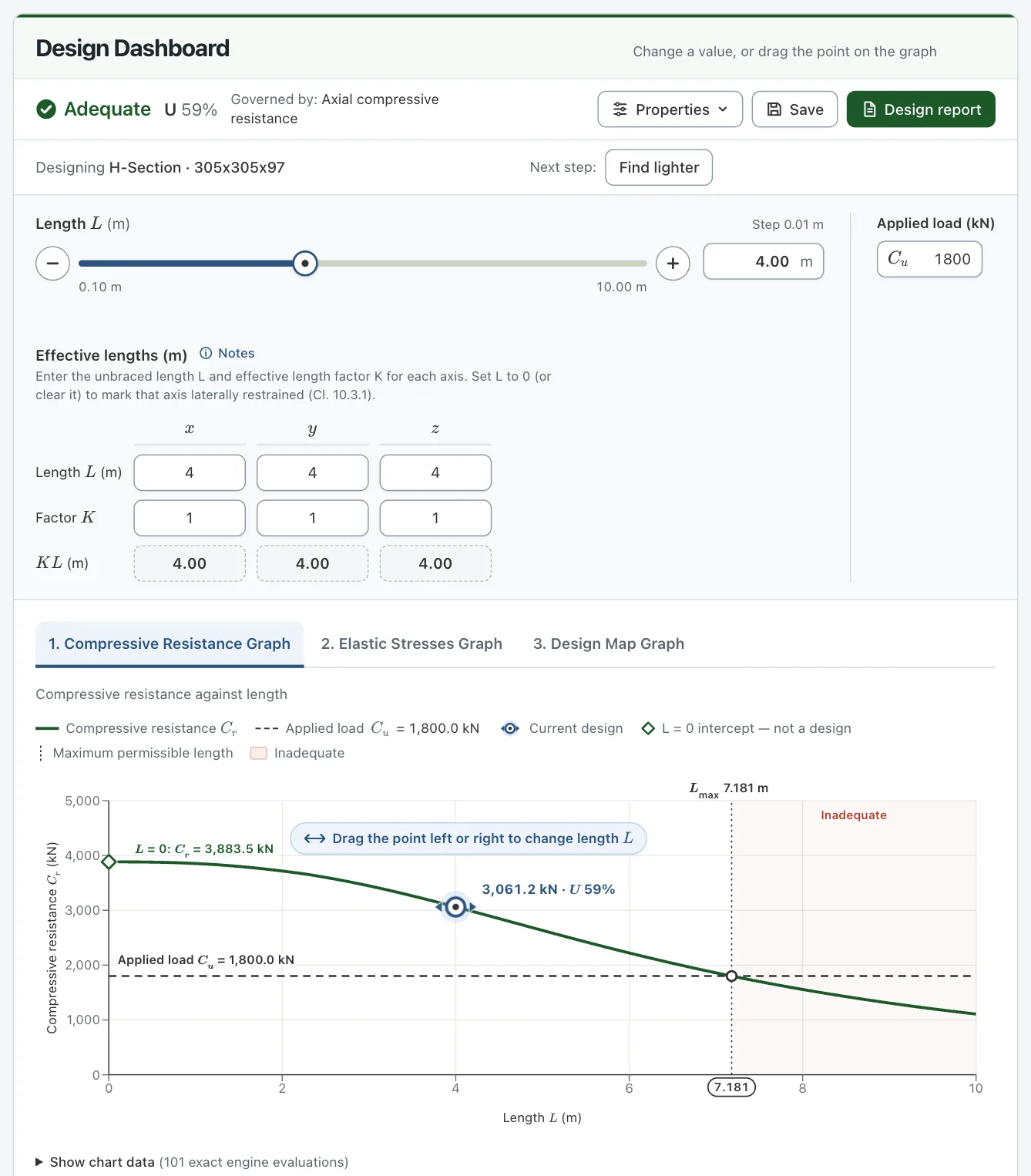
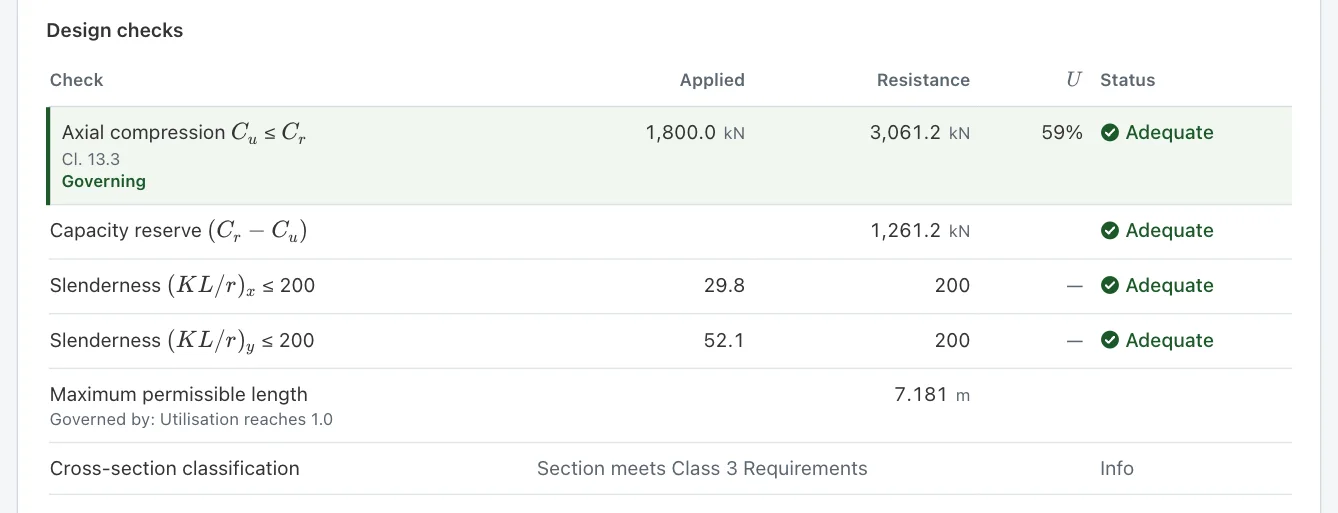
Screenshots of the app · H-section 305×305×97, S355JR, L = 4.0 m, Cᵤ = 1 800 kN

Column design · I and H-sections · Design Dashboard
Column design dashboard for an H-section 305×305×97: status Adequate at U = 59 %, the length slider at 4.00 m, effective lengths, and the graph of compressive resistance against length crossing the applied load at 7.181 m.
design panels across 7 member families
26
2011 edition for hot-rolled steel; SANS 10162-2 for cold-formed purlins
SANS 10162-1
section tables — hot-rolled, hollow and cold-formed
SAISC
for every member, with section sketch and substituted formulas
Design Report

Design modules

7 member families. 26 design panels.

Every panel you can select in the app, grouped as the member picker groups them. Each module carries its own Design Notes setting out exactly what it covers.

The design modules open once you sign in to your workspace.

Columns

11 panels

SANS 10162-1, cl. 13.3

Axial compression: cross-section classification, flexural, torsional and flexural–torsional buckling, and the factored compressive resistance against the applied load.

  • I / H
  • RHS / SHS
  • CHS
  • Tee
  • Angle
  • Channel

Built-up

  • Channels Welded Toe-to-Toe
  • Channel Sections Back-to-Back
  • Angle Sections Back-to-Back
  • Box of Angle Sections
  • Starred Angles

Beams

5 panels

SANS 10162-1, cl. 13.4–13.6

Bending: classification for flexure, moment resistance with lateral–torsional buckling over the unbraced length, shear, web bearing and slenderness.

  • I / H
  • Channel
  • Tee
  • RHS / SHS
  • CHS

Beam-columns

2 panels

SANS 10162-1, cl. 13.8

Axial compression with bending about one or both axes, using the interaction checks of Clause 13.8 with moment amplification.

  • I / H
  • Channel, tee, RHS/SHS, CHS

Composite beams

1 panel

SANS 10162-1, cl. 17

A steel I-section acting with a concrete slab through shear connectors — the bare steel beam during construction, then the composite beam in service, including the shear connection and deflections.

  • I-section + slab

Tension members

2 panels

SANS 10162-1, cl. 13.2

Angles or channels connected by fillet welds, and single angles connected through one or two bolt rows — the governing tensile resistance against the factored tension.

  • Welded connection
  • Bolted angle

Connections

4 panels

SANS 10162-1

Bolt groups under shear with an in-plane moment or with tension, and unstiffened bolted or welded seat angles supporting the end of a beam.

  • Bolts shear + moment
  • Bolts shear + tension
  • Welded angle seat
  • Bolted angle seat

Purlins

1 panel

SANS 10162-2, cl. 3.3.3

Cold-formed lipped channel or lipped zed purlins over one or more equal spans, for downward load and wind uplift, with the serviceability deflection check.

  • Continuous span

How it works

From section to signed Design Report in three steps

See the full product tour
Step 1 · Choose the member and section
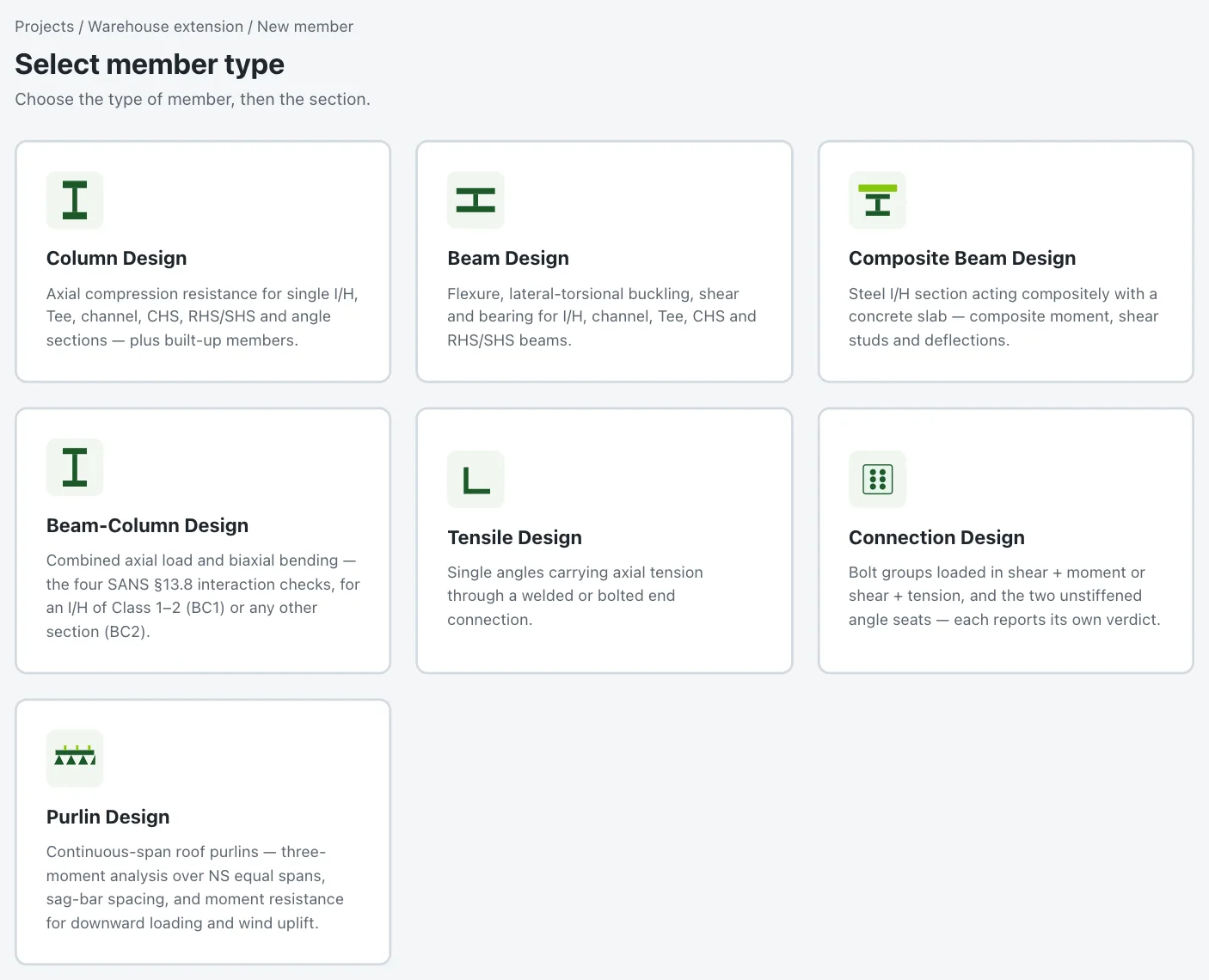
Select member type screen listing seven families: column, beam, composite beam, beam-column, tensile, connection and purlin design.
  • SANS 10162 throughout

    Hot-rolled members are checked to SANS 10162-1:2011, with clause references on the design checks. The purlin module follows SANS 10162-2 for cold-formed steel.

  • SAISC section tables

    Pick I and H sections, channels, angles, tees, CHS, RHS and SHS — or cold-formed lipped channels and zeds for purlins. Where a module allows it, enter your own section dimensions.

  • An interactive Design Dashboard

    Move the length slider, or drag the point on the graph, and the member is re-checked at once: the resistance curve, the maximum permissible length and the design map, with a 3D member view on most modules.

  • Find & compare sections

    Search for the lightest adequate section, or a lighter or shallower one, at the current design point, and compare up to four sections side by side — each checked by the same design engine.

SteelChat A.I · built in

Ask the code a question, get the clause back

SteelChat A.I is the assistant built into SteelDesignPro. It sits beside every page of the app and sees the member you are designing. Ask it about a clause, a symbol or a section, and it answers from the standards and names the clause it relies on.

Engineers ask it

  • Which clause covers lateral-torsional buckling?
  • What does K mean in KL/r?
  • Give me the dimensions of a 305x305x97
  • Why is my section Class 3?
Try SteelChat A.I free25 questions in the 14-day trial. No card needed.
SteelChatA.ISANS 10162-1:2011 assistantIllustration

Which clause gives the compressive resistance of a hot-rolled column, and which n do I use?

SANS 10162-1:2011 Cl. 13.3.1 gives the factored compressive resistance Cr = ϕ A fy (1 + λ2n)−1/n, with λ = √(fy / fe).

For hot-rolled sections use n = 1.34. n = 2.24 applies to welded three-plate members with flame-cut flange edges, and to hot-formed or stress-relieved hollow sections.

SANS 10162-1:2011 · Cl. 13.3.1

  • Answers with the clause

    It answers from SANS 10162-1:2011, SANS 10160-2:2011 and the SAISC Red Book 2013, and names the clause or section it relies on.

  • Sees the member on your screen

    On a design page it reads the section, grade, lengths and loads you have entered, so you can ask about your design without retyping it.

  • Numbers from the design engine

    Ask it to check a column and the figures come from the same design engine as the design pages, not from the chat model.

  • Section data on request

    Ask for a SAISC section by its designation and get its mass and dimensions back, or list the sections in a family.

  • Attach a drawing or a PDF

    Drop an image or a PDF into the chat and ask about it.

  • Included in every plan

    Every plan has a monthly number of questions, and the 14-day free trial includes 25.

SteelChat A.I helps you find and read the code. It does not replace the design checks or your engineering judgement.

Transparency & reporting

Show the working. Keep the record.

A reviewer should be able to follow a design without opening the software. SteelDesignPro sets out each member's calculation in its Design Report and records who did what to it.

  • Clause references on the design checks, and the governing check named in the verdict
  • A Design Report for each member, with a dimensioned section sketch and the design formulas shown with their values substituted
  • Reports printed or saved as PDF from the browser, and a project report that gathers every member
  • Draft → submitted → approved → signed off, each step by role and kept in the sign-off history
  • A hash-chained activity log for each workspace, so a changed record is detectable

The app records the review and sign-off steps your team takes. It does not certify a design — professional sign-off remains the engineer's responsibility.

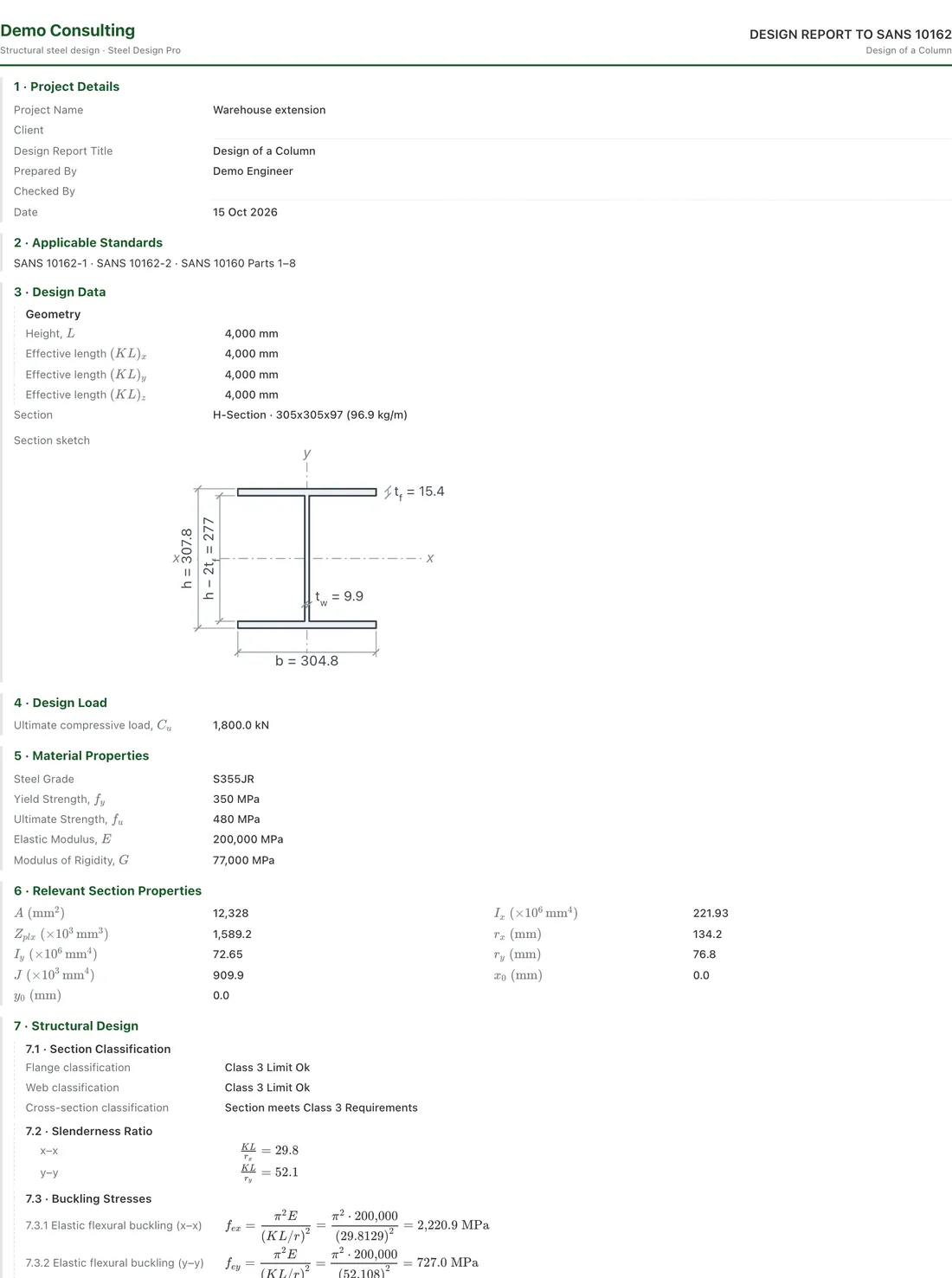
Design Report to SANS 10162 · Column
Design Report to SANS 10162: project details, applicable standards, design data with a dimensioned section sketch, loads, material and section properties, and the structural design steps with substituted formulas.
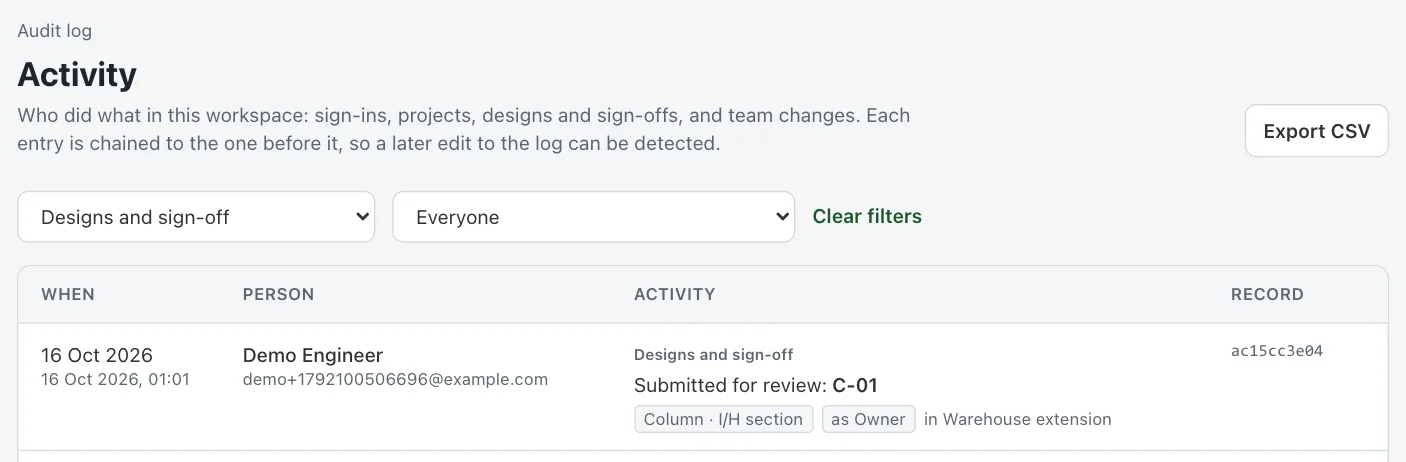
Audit log · Activity
Workspace activity log filtered to designs and sign-off: the time, the engineer and their email, the design submitted for review, and the start of its hash.

Plans and prices

Priced for South African engineers

Every plan has every design module and the same Design Report. Prices are in rand and include VAT. Every new account starts with a 14-day free trial of the Practice plan, and no card is needed.

Compare every feature

Student

Students and lecturers with a university email address (.ac.za)

R 49/ month

or R 490 a year

  • All 26 design panels
  • Design Reports and project reports
  • Design Notes & Help on every module
  • 10 projects
  • SteelChat A.I: 30 questions a month
Most popular

Professional

A practising engineer working on their own

R 499/ month

or R 4 990 a year

  • Everything in Student
  • Unlimited projects
  • Submit, approve and sign off your designs
  • Hash-chained activity log
  • SteelChat A.I: 200 questions a month
  • Email support within 2 working days

Practice

A consulting practice with 2 to 15 engineers

R 1 690/ month

or R 16 900 a year · 5 people included, R 299 a month per extra person

  • Everything in Professional
  • One workspace with shared projects
  • Engineer, reviewer and Pr.Eng roles
  • Review and sign-off between people
  • Practice activity log with CSV export
  • SteelChat A.I: 1 000 questions a month, shared
  • Priority support within 1 working day

Business

Larger firms, fabricators, universities and government

From

R 4 500/ month

Billed annually, by quotation · 15 people and more

  • Everything in Practice
  • Limits set for your organisation
  • Classroom licences for universities
  • Pay by invoice and EFT
  • Onboarding and a training session
  • SteelChat A.I allowance agreed with you

About SteelDesignPro

Built on Prof. J. Mahachi's design procedures

SteelDesignPro grew out of the SANS 10162 steel design workbook of Prof. Jeffrey Mahachi, Pr.Eng, and is now a web application in its own right.

Its calculation routines follow Prof. Mahachi's design procedures for each member type. Automated regression tests guard every design panel, and the modules he has revised reproduce his own printed worked examples. The Design Notes on each module are his notes, edited for the app.

Design procedures
Prof. Jeffrey Mahachi, Pr.Eng
Design code
SANS 10162-1:2011; SANS 10162-2 for purlins

Contact

Talk to us

Questions about SteelDesignPro, its design modules or plans for your practice? Call us, or visit our offices in Randpark Ridge.